
MS9354 Video Split for Edge Analysis — 1×2 with 640×480 Crop to CSI
When a game console, camera, or set-top box must drive a full-quality monitor and an edge AI pipeline at the same time, the usual conflict is clear: the analytics path cannot (and should not) ingest full-resolution high-refresh frames, while the main display must not be degraded for the algorithm. A 1-in-2-out split built on MacroSilicon MS9354 keeps the pristine picture on TXA and sends a cropped ROI on TXB into a CSI SoC running YOLO-class trackers—low latency, clean roles, easy integration.
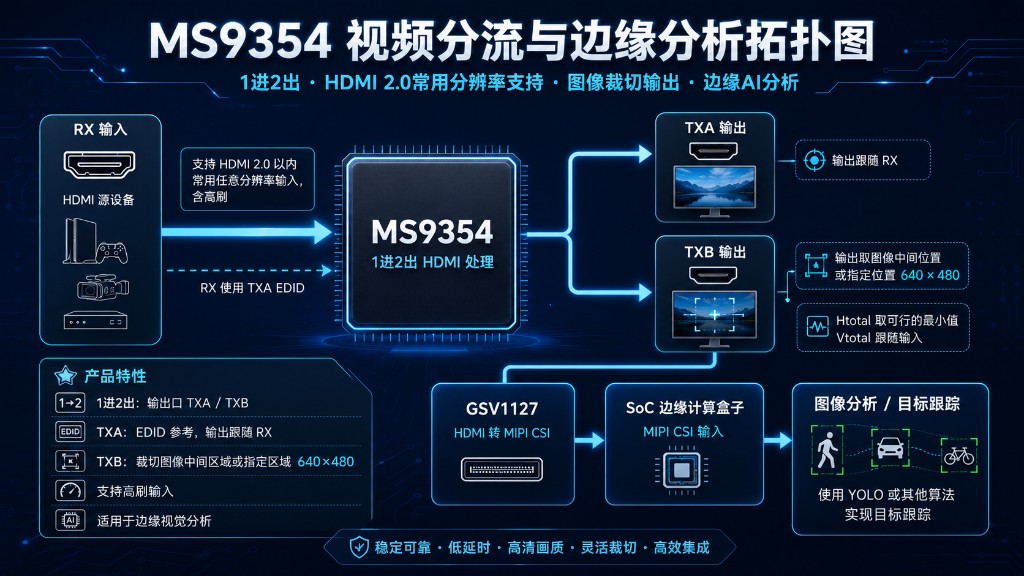
1. What the Solution Does
Typical path:
Console / camera / STB (HD 2.0, incl. high refresh)
        │
        ▼
   MS9354 RX  ────── EDID from TXA
        │
   ┌────┴────┐
   │         │
  TXA       TXB
   │         │
   │         │  Center or specified ROI → 640×480
   │         │  Min feasible Htotal; Vtotal follows input
   ▼         ▼
 Monitor    GSV1127 (HD → MIPI CSI)
             │
             ▼
        SoC edge box
             │
             ▼
     YOLO / similar → detect & track
Five anchors:
| Capability | Behavior |
|---|---|
| 1-in-2-out | One RX to TXA and TXB |
| EDID | RX uses TXA EDID for stable main-display negotiation |
| Input range | Common HD 2.0 resolutions, including high refresh |
| TXA | Follows RX—primary viewing path stays intact |
| TXB | Center or specified 640×480 crop; minimize Htotal, Vtotal follows input for CSI / compute load |
TXB feeds Gscoolink GSV1127 for HD → MIPI CSI, then an edge SoC runs YOLO or similar detect/track models for boxes, IDs, and events.
Confirm registers, timings, and production limits against MS9354 / GSV1127 datasheets and sample boards.
2. Why Split + Crop
Real-time tracking at the edge is rarely limited by “having a model.” Bottlenecks are:
- Compute and bandwidth — shoving 4K / high-refresh frames into CSI saturates the bus and burns NPU cycles on background pixels.
- Main-path experience — retiming the whole feed for analytics risks sparkles, drops, and EDID fallout on the monitor.
- Region of interest — crosshairs, people, vehicles, defects usually sit in a center or fixed window; cropping to
640×480first is the better trade.
MS9354 separates duties: TXA owns viewing; TXB owns ROI; GSV1127 + SoC own algorithms—cleaner bring-up and certification slices.
Minimizing Htotal while letting Vtotal follow the source shortens line period at fixed active 640×480, easing pixel clock on CSI, and keeps field rate closer to the main path (validate on the bench).
3. Role of Each Stage
3.1 MS9354 (MacroSilicon)
- HD 2.0 1-in-2-out distribution / split (also listed under Video Distribution).
- RX: consoles, industrial / pro cameras, STBs.
- TXA: monitors, confidence screens, venue displays.
- TXB: ROI crop for the analytics branch.
3.2 GSV1127 (Gscoolink)
- Converts TXB HD timing/pixels to MIPI CSI for phone-class or industrial SoC camera ports.
- Related parts: Gscoolink Bridge.
3.3 SoC edge box
- YOLO, YOLO-world, custom detectors, or classic CV.
- Outputs: boxes, track IDs, alerts, coordinates for game tools, PLC, or VMS backends.
4. Target Applications
| Application | TXA (main) | TXB → CSI (edge) |
|---|---|---|
| Gaming / cloud-game assist | Player view, high refresh preserved | Track crosshair / characters; annotation |
| Sports & live events | Switcher confidence | Track athletes / ball for auto framing |
| Security & perimeter | Duty monitor | Person / vehicle / object tracks and events |
| Traffic / junctions | Local preview | ROI vehicle tracking (compliance required) |
| Industrial vision | Full station on HMI | Fixed-window defect / presence checks |
| Education / meetings (non-diagnostic) | Room display | Region highlight / focus tracking |
| Robotics / teleop | Operator primary video | ROI tracking to cut uplink and tighten the loop |
Shared pattern: do not hurt the viewing path; give analytics only the pixels that matter.
5. Target Markets
5.1 Consumer & entertainment
- Esports accessories / AI camera add-ons that understand the picture without hijacking the console’s main output.
- Livestream tools: TXA for program/confidence; TXB for PTZ assist or markup.
5.2 Security & smart spaces
- Edge boxes that avoid “decode full stream then downscale.”
- Warehouses, campuses, retail—stable local viewing plus on-device alerts.
5.3 Industrial & machine vision
- CSI-native SoCs map cleanly via GSV1127 from the HD display domain.
- OEMs can ship a common crop-to-CSI board and swap algorithm SKUs per line.
5.4 SI / ODM channels
- Distribution / matrix vendors adding an “analytics tap” SKU.
- IPKVM, remote ops, and classroom capture needing full-screen confidence plus ROI compute.
Value line: stable low-latency main path + flexible crop + efficient CSI integration.
6. Engineering Checklist
- EDID: drive RX from TXA monitor capability; calibrate TXB crop against input format matrices.
- ROI: center by default; freeze coordinates per resolution set when using a custom window.
- High refresh: prove dual-output stability; verify CSI lanes, pixel clock, and ISP bypass early.
- Sync: if overlays return to the main view, define timestamps or field alignment.
- Privacy / policy: game assists and roadside use need local compliance review.
- Certification: HDCP, EMI, safety at the product level; key storage notes in HD 2.0 & MS8003.
7. Summary
MS9354 splits HD 2.0 into TXA follow-RX viewing and a TXB 640×480 ROI; GSV1127 carries that ROI to MIPI CSI for YOLO-class tracking on an edge SoC. Protect the monitor experience, spend compute where the target is—fit for gaming accessories, security edge, industrial vision, and SI “watch + analyze” products.
When scoping a similar tap, converge input resolution/refresh tables, ROI placement, and SoC CSI limits together, then lock crop timing and algorithm frame budget.