
KM Box Serial Control Solution
KM Box is built on CH645W. It receives text commands over a USB virtual serial port (115200 8N1) and presents a USB HID keyboard/mouse to the controlled PC. A physical keyboard/mouse can also pass through and switch between two hosts. A controller app or script sends km.* commands; the controlled side needs no special drivers.
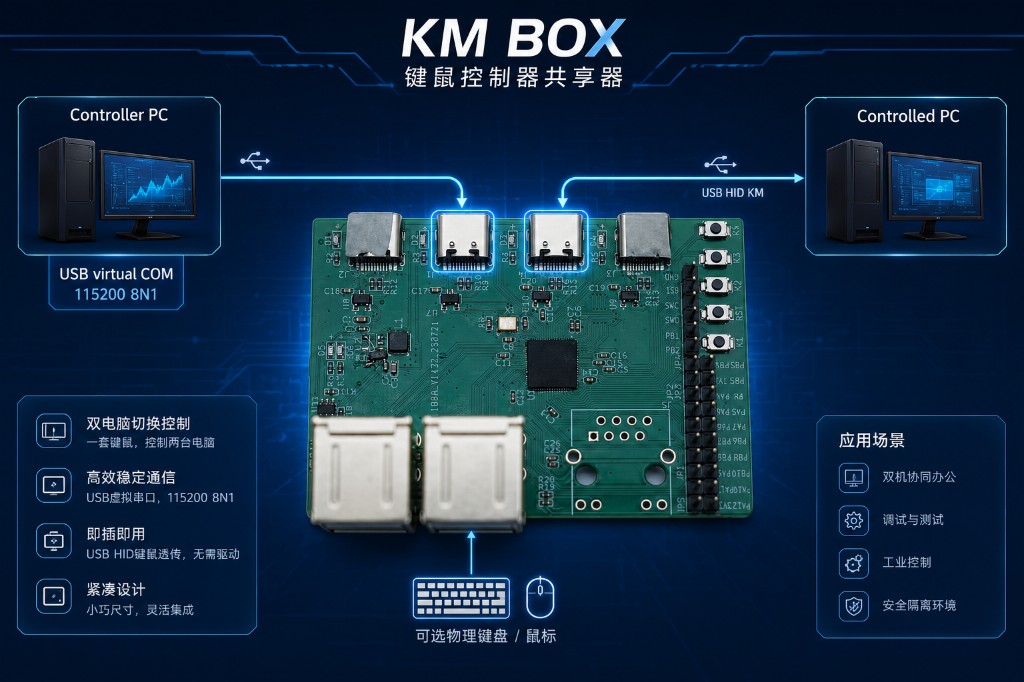
Materials, hardware, and support
See CH645 / CH645W for IC specs. Design materials, hardware purchasing, and support are available via doc.ultrasemi.com. Treat firmware km.help() as the authoritative command list.
1. CH645W On-Chip Path vs Multi-Chip Stacks
Many KM / KVM builds combine an external USB HUB + MCU + analog USB switch (plus other bridges). Protocol traffic crosses board traces and chip-to-chip links repeatedly, so latency and jitter stack up—cursor drift, slow hotkeys, and weaker hot-plug behavior are common pain points.
This design uses one CH645W with multiple USB HS PHYs, composite/HUB channels, and KVM-oriented switching:
- Shorter on-chip communication: serial parsing, HID report generation, and dual-host KM switching stay inside the die—faster and more predictable than multi-chip board interconnects.
- Fewer companion ICs: no need to stack a HUB IC plus analog switch matrix just for KM routing—cleaner BOM and layout.
- Plug-and-play on the controlled PC: standard USB HID, no proprietary driver.
- Simple control protocol:
115200 8N1text commands for move, click, keys, and strings.
IC specs, part comparison, and block diagram: CH645 page.
2. Product and Connection
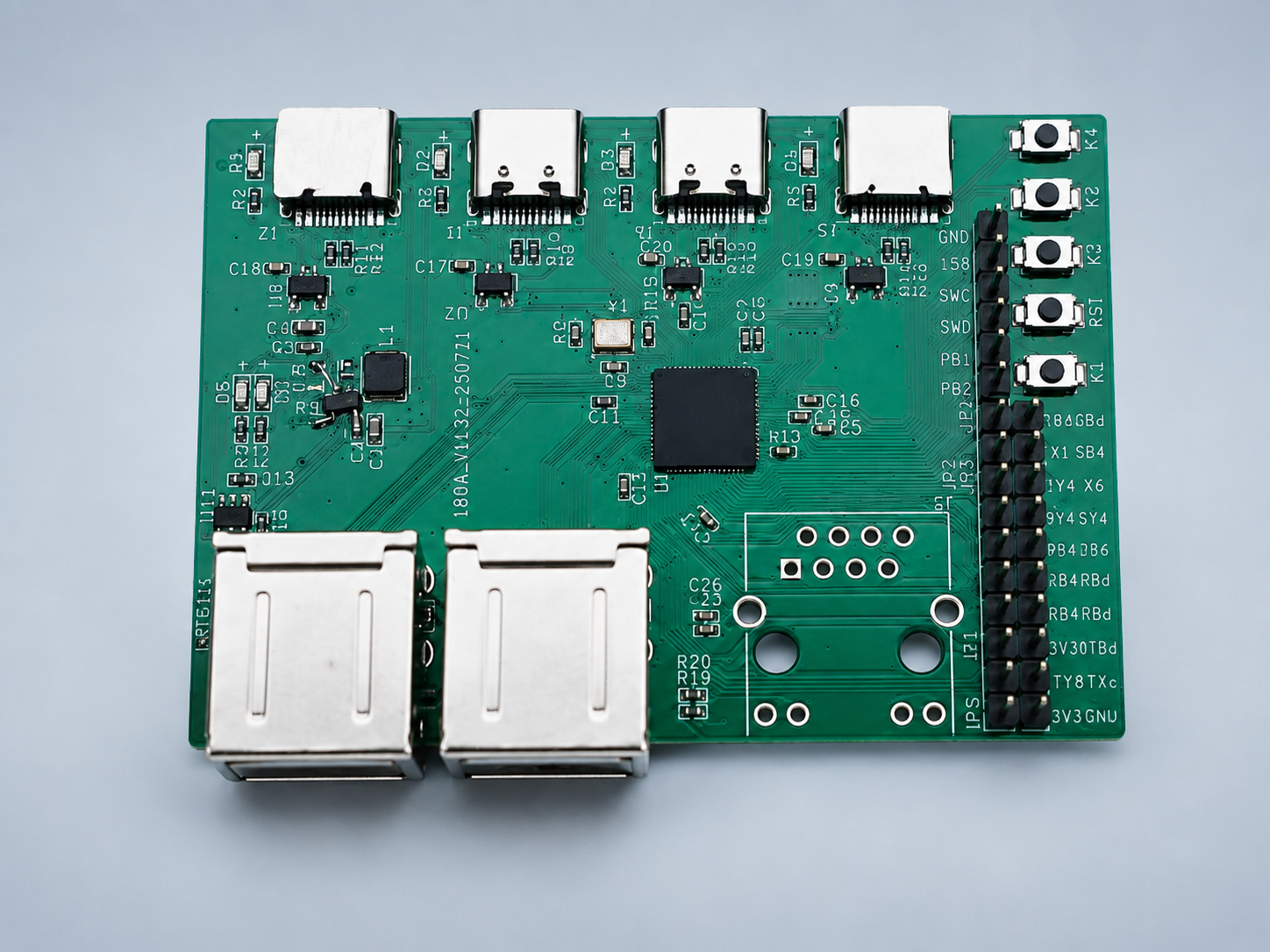
Typical wiring:
| Role | Connection | Notes |
|---|---|---|
| Controller | Script / host app sends text commands to the box serial port | USB virtual COM 115200 8N1 |
| Controlled PC | USB to the box; OS sees a HID keyboard/mouse | Driver-free USB HID |
| Physical KM (optional) | Plug into the box USB ports | Shares cursor / focus with serial commands; dual-host switch |
Controller PC                 Controlled PC
   │                              │
   │  USB virtual COM               │  USB HID KM
   │  115200 8N1                    │
   └──────────► KM Box (CH645W) ◄────┘
                  ▲
                  │ optional physical mouse / keyboard
Typical use cases: dual-PC office workflows, bring-up and test benches, industrial operator stations, and air-gapped control where the controller drives the target via HID without an extra network path.
3. Serial Parameters
| Item | Value |
|---|---|
| Interface | USB virtual serial (COM port in Device Manager) |
| Baud rate | 115200 |
| Data bits | 8 |
| Parity | None |
| Stop bits | 1 |
| Line ending | End each command with a newline (Enter) |
Notes:
- Keep each command under 64 characters when possible.
- Sending too fast may drop new commands when the internal queue is full—add spacing.
- Use a UTF-8 terminal so help text is not corrupted.
To list commands after connect, send km.help(). The device returns the supported command set and formats.
4. Command Syntax
- Commands start with
km.; arguments go in parentheses. - Separate multiple arguments with commas.
- Numbers may be negative, e.g.
km.move(-50, 20). - Keys may be names or numeric keycodes; strings use double quotes, e.g.
km.string("Hello"). - Command names are case-insensitive (prefer lowercase).
5. Command Overview
| Command | Function |
|---|---|
km.help() | Show command list |
km.init() | Clear keyboard state and release held keys |
km.move(x,y) | Relative mouse move |
km.left(x) | Left button down / up |
km.right(x) | Right button down / up |
km.middle(x) | Middle button down / up |
km.side1(x) | Side button 1 (forward) down / up |
km.side2(x) | Side button 2 (back) down / up |
km.click(x,y) | Single mouse click |
km.wheel(x) | Scroll wheel |
km.turbo(x,y) | Auto-repeat mouse clicks |
km.down(x) | Key down |
km.up(x) | Key up |
km.press(x,y) | Key tap (auto release) |
km.string("text",t) | Type a string |
6. Mouse Commands
6.1 Relative move km.move(x, y)
| Arg | Meaning |
|---|---|
x | Horizontal delta; right positive, left negative |
y | Vertical delta; down positive, up negative (optional; omit for horizontal-only) |
km.move(100)
km.move(100, 50)
km.move(-200, -80)- Large distances are split into multi-step straight moves automatically.
- There is a per-command step limit; split very large moves.
- Motion is asynchronous—wait tens to hundreds of milliseconds before the next command.
6.2 Hold / release
km.left / km.right / km.middle / km.side1 / km.side2: 1 = down, 0 = up.
km.left(1)
km.left(0)
km.right(1)
km.side1(0)
These do not auto-release; send 0 yourself, or use km.click.
6.3 Single click km.click(x, y)
| Arg | Meaning |
|---|---|
x | 1 left, 2 right, 3 middle, 4 side1, 5 side2 |
y | Hold time in ms; default 75; optional |
km.click(1, 50)
km.click(2, 100)
6.4 Wheel km.wheel(x)
Positive scrolls up; negative scrolls down. Examples: km.wheel(3), km.wheel(-5).
6.5 Turbo km.turbo(x, y)
| Arg | Meaning |
|---|---|
x | 1–5 per table; 0 disables all turbo |
y | Interval in ms; 0 disables that button; omit ≈ 100ms |
x | Button |
|---|---|
1 | Left |
2 | Right |
3 | Middle |
4 | Side 1 |
5 | Side 2 |
km.turbo(1, 80)
km.turbo(1, 0)
km.turbo(0)
7. Keyboard Commands
7.1 Key notation
- Names (preferred):
km.down("a"),km.press("enter"),km.press("1") - Numeric keycodes:
km.down(4)(see HID keyboard scan codes) - A single quoted uppercase letter implies Shift:
km.press("A")
7.2 Down / up / press
km.down("w")
km.up("w")
km.press("a")
km.press("enter", 100)
km.press(x, y) presses then releases; y is hold time in ms (default 75).
7.3 Type string km.string("text", t)
Types ASCII in order, with Shift handling for uppercase and common symbols. t is per-character delay in ms (default 75).
km.string("Hello")
km.string("Hi", 100)
7.4 Reset km.init()
Stops text input, clears keyboard state, and releases serial-held keys. Use after script faults or stuck keys.
8. Common Key Names
| Category | Examples |
|---|---|
| Letters / digits | a–z, 0–9 |
| Editing | enter, esc, backspace, tab, space, capslock |
| Modifiers | shift / lshift, ctrl / lctrl, alt / lalt, win / lgui |
| Navigation | up down left right, home end, pageup/pgup, pagedown/pgdn |
| Function | f1–f12, insert/ins, delete/del, printscreen |
Ask support or validate on hardware for the full name list.
9. Examples
9.1 Move then left-click
km.move(300, 200)After motion settles (typically 200–500 ms depending on distance):
km.click(1, 75)9.2 Chord Ctrl+C
km.down("ctrl")
km.press("c", 50)
km.up("ctrl")
9.3 Type text and Enter
km.string("notepad")
km.press("enter", 80)
9.4 Left-button turbo and stop
km.turbo(1, 50)
km.turbo(0)
Or: km.turbo(1, 0).
9.5 Recovery
km.init()
km.left(0)
km.right(0)
10. Troubleshooting
| Symptom | Suggestion |
|---|---|
| No response | Check COM port, baud 115200, and trailing newline |
| Occasional drops | Slow the send rate; keep commands ≤ 64 chars |
| Choppy long moves | Large moves are multi-step by design |
| Stuck keys | Run km.init() and km.up for held keys |
| Mouse button stuck | Send km.left(0) (etc.) or replug USB |
| No absolute screen coordinates | Relative move only; compute offsets on the controller |
| Separate controller / controlled PCs | Cursor position cannot be read back; coordinate with software on the controlled side or stay relative |
11. Notes
- MCU: CH645W.
- Authoritative command set: device
km.help()output. - This page tracks user manual v1.0.