
LK9300 Multi-Input to MIPI DSI Display Solution
Overview
LK9300 is a multi-input MIPI DSI display solution for embedded screens, portable monitors, equipment preview displays, and multi-source observation terminals. It combines input reception, image scaling, frame rate adaptation, and composition into a common display output.
The solution supports HDMI, DP, or USB-C DP Alt Mode input up to 4K60, processing the received video for a MIPI DSI panel. USB-C video input requires a source with DP Alt Mode support; the actual port combination and peripheral circuitry depend on the board design. The 4K60 specification describes input reception, not panel output resolution or simultaneous multi-window processing capacity.
Key advantage: source and panel timing do not need to match exactly
Conventional pass-through display bridges without scaling or frame rate conversion typically require source timing to match the panel. BIOS screens, boot menus, or operating-system resolution changes can become invisible when the source timing differs from the panel's requirements.
LK9300 uses Scaler and FRC to convert supported inputs to the panel's resolution, refresh rate, and output timing. A supported BIOS video mode can therefore be displayed even when its timing differs from the panel's native mode, without requiring the host to always generate panel-matched timing.
Demonstration unit
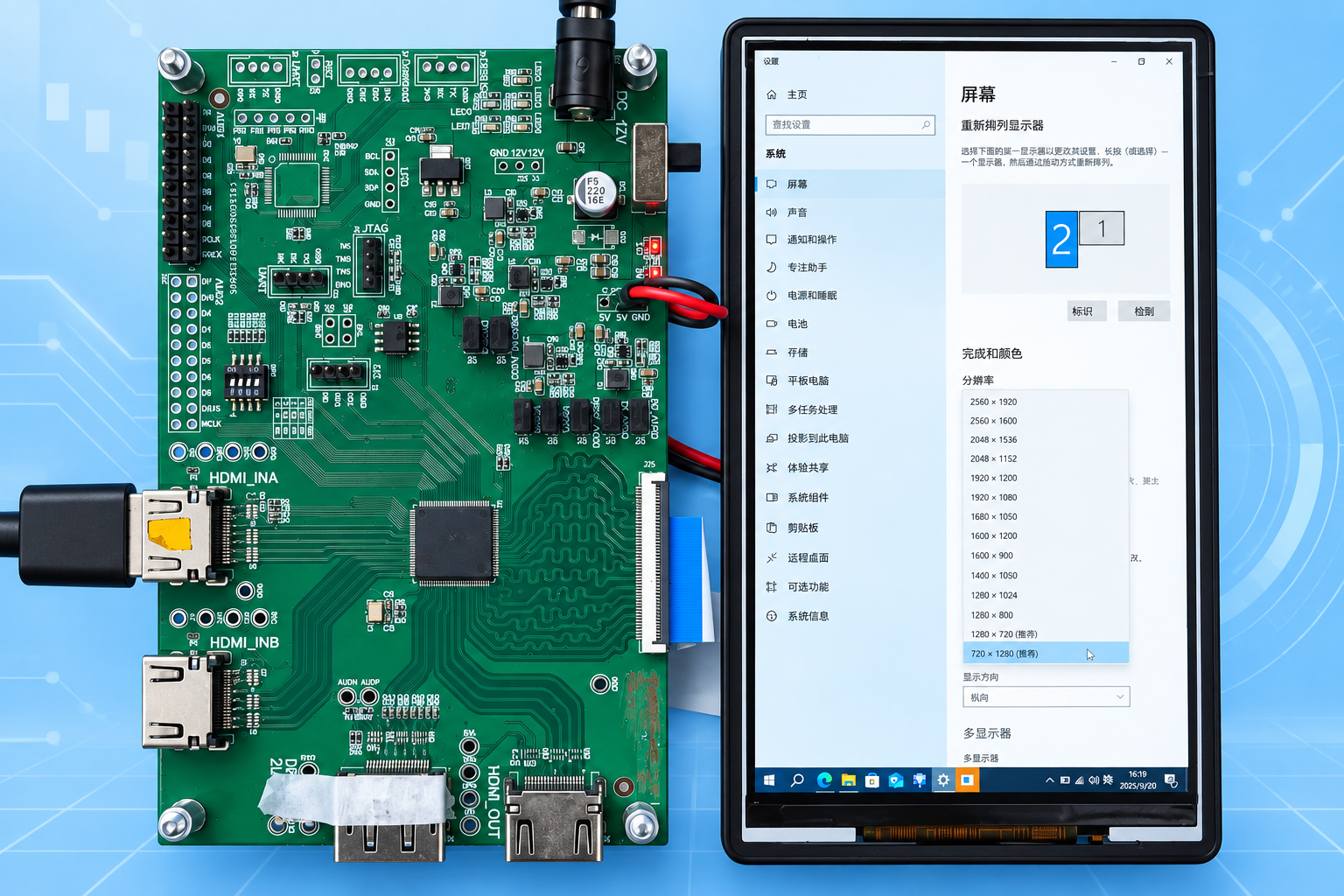
The demonstration unit uses a 720×1280 @ 60 Hz portrait MIPI DSI display to demonstrate the multi-input display solution. This is the current demo configuration, not the solution's maximum supported resolution.
Comparison with pass-through display bridges
| Item | Pass-through without Scaler / FRC | LK9300 video processing |
|---|---|---|
| Source and panel timing | Typically must match resolution, refresh rate, sync, and blanking requirements | Processing adapts source timing to an independent panel output |
| BIOS / boot display | May remain blank when source and panel timing differ | Converts supported BIOS input modes to panel timing |
| OS resolution changes | May require restoring a specific panel-compatible source mode | Scaler and FRC adapt supported input modes |
| High-resolution source to lower-resolution panel | Interface pass-through alone cannot resize the image | Receives up to 4K60 and processes it for the target panel |
| PIP / Multiview | Pure pass-through does not compose multiple pictures | Supports picture-in-picture and multi-source layouts |
This comparison concerns pure pass-through designs without scaling, frame-buffer timing adaptation, or FRC. BIOS compatibility should be tested with the target host. Input changes may still require signal relocking; this is not a guarantee of every host, every timing, or uninterrupted video during transitions.
Four core capabilities
Scaler: image resizing and panel adaptation
Scaler processing resizes an input image to the panel resolution or a selected display window. Aspect-ratio preservation, full-screen scaling, and cropping policies can be configured to suit the project.
- Adapt source dimensions to the panel's native resolution.
- Define image sizes for PIP windows and Multiview regions.
- Select a display policy appropriate to source and panel aspect ratios.
FRC: frame rate conversion
FRC (Frame Rate Conversion) adapts input video cadence to the target output rate when the source and panel refresh rates differ. This supports fixed-refresh panels and multi-source display configurations.
Supported rate combinations, buffering requirements, and processing latency depend on the configuration. FRC here refers to frame rate adaptation, not a claim of motion-estimated, motion-compensated interpolation (MEMC).
PIP: picture-in-picture
PIP places a secondary video window within the main picture, allowing a host display and camera preview, or a primary and auxiliary source, to be viewed together.
Main and secondary sources, window position, and window size can be configured for the project, with layout switching through the control interface.
Multiview: multiple sources on one panel
Multiview arranges multiple video sources on a single MIPI DSI panel for monitoring, comparison, and preview. Project layouts can include side-by-side regions or main and secondary windows, using Scaler and FRC to adapt image dimensions and output cadence.
Concurrent input count, window count, per-window resolution, and refresh rate depend on the interface combination, processing bandwidth, and firmware configuration. Multiple connectors do not imply that all inputs can be displayed simultaneously at their maximum specifications.
Signal flow
- Input reception: receive the selected HDMI, DP, or USB-C DP Alt Mode sources.
- Image processing: scale images and adapt frame rates for the display configuration.
- Composition: organize content as a single image, PIP, or Multiview layout.
- DSI panel drive: match panel timing, initialization commands, power sequencing, and backlight control.
This describes the functional flow; hardware processing order and resource allocation depend on the implementation.
Configuration overview
| Item | Description |
|---|---|
| Solution name | LK9300 |
| Target output | MIPI DSI panel |
| Demo resolution / refresh rate | 720×1280 @ 60 Hz (portrait) |
| Input options | HDMI, DP, USB-C DP Alt Mode; port mix defined per project |
| Maximum input resolution | 4K60; color format, bit depth, and link configuration confirmed per project |
| Timing adaptation | Source timing need not exactly match panel timing; supported BIOS and OS modes are adapted to panel output |
| Scaler | Resize images to the panel or display window |
| FRC | Adapt input frame rates to the target output rate |
| PIP | Main picture with a secondary video window |
| Multiview | Multi-source regions and layout composition |
| Panel integration | Resolution, refresh rate, DSI lanes, initialization, power, and backlight |
| Customization | Port mix, layouts, switching controls, and panel integration |
Applications
- Portable monitors: view a main source with an auxiliary preview.
- Embedded display terminals: connect external video sources to a MIPI DSI panel.
- Multi-source preview equipment: observe several inputs through PIP or Multiview.
- Industrial operator and observation terminals: arrange host output and on-site video.
- Demonstration and test equipment: compare sources on a common display.
Panel integration and evaluation
MIPI DSI integration requires matching both video timing and panel control. Please provide:
- Panel model, datasheet, native resolution, refresh rate, and pixel format.
- DSI lane count, lane rates, operating mode, and initialization commands.
- Power and reset sequencing, backlight requirements, and FPC pinout.
- Input types, port count, and resolution and frame rate for each source.
- Required single-image, PIP, or Multiview layouts and concurrent source count.
- Acceptable display latency, audio synchronization, and content protection requirements.
LK9300 is the solution name used on this page, with feature planning referencing the GSV9001S video-processing specification summary. Up to 4K60 describes input reception; MIPI DSI output resolution, concurrent window count, and per-window processing specifications depend on hardware bandwidth, firmware, and the target panel. Provide both BIOS and operating-system input modes when evaluating boot-to-desktop display compatibility.
Contact
For LK9300 multi-input MIPI DSI display evaluation, contact doc@ultrasemi.com. Include panel documentation, input specifications, and your intended PIP or Multiview layout.